
Aadhaar
Services
ELCOT is one of the agencies empanelled by the Unique Identification Authority of India (UIDAI) to execute Aadhaar enrollment and updation activities. ELCOT has established 376 PECs (Permanent Enrollment Centre) across the State of Tamil Nadu for providing Aadhaar-related services to the citizens.

ELCOT initiated the operation of Permanent Enrolment Centres (PECs) from October 2016 onwards. Currently, 376 PECs have been established at 38 District Collectorates, 14 Municipal Corporation Headquarters, 36 Municipal Zonal offices, 125 Municipalities, 9 Corporation Divisional office, 24 Town Panchayats, 3 Revenue Divisional Offices, 113 Block Development Offices, 10 Village Panchayats, 1 Special Township in Neyveli, 1 Treasury and Accounts, and 2 Provident Fund offices. ELCOT operates Permanent Enrolment Centres (PECs) since October 2016. Currently, 376 PECs Centres have been established across the state and has completed 23.6 lakhs transactions during the financial year 2025-2026. ELCOT as a Registrar has been conducting camps for school students under the ‘Aadhaar Through Schools’ Project at the school premises across all districts of Tamil Nadu since November 2025 and has successfully carried out 3.23 lakhs transactions under this project.
ELCOT and TACTV Aadhaar Centres List
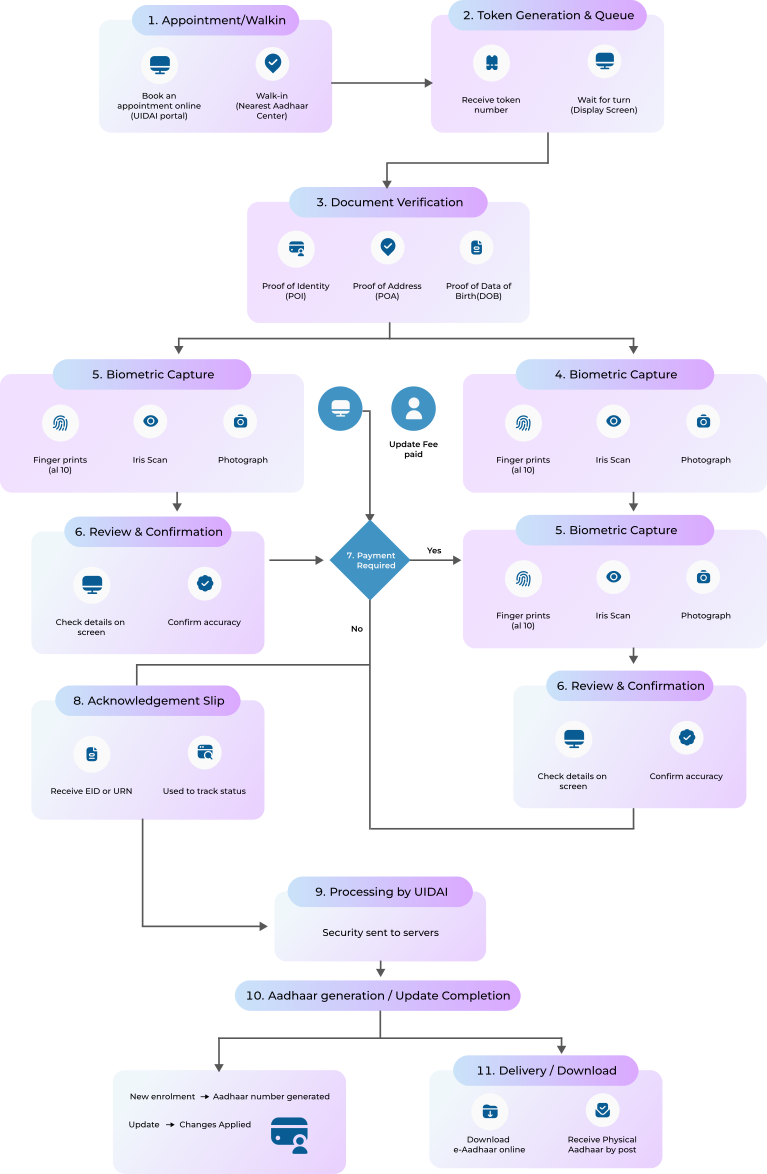
Aadhaar Work Progress
1. Appointment / Walk-in
You can either:
- Book an appointment online via the UIDAI portal
- Walk-in to the nearest Aadhaar Center
2. Token Generation & Queue
At the center:
- You receive a token number
- Wait for your turn (display screens announce tokens)
3. Document Verification
Submit required documents:
- Proof of Identity (POI)
- Proof of Address (POA)
- Proof of Date of Birth (DOB) (if needed)
- The operator verifies originals
4. Data Entry / Update
Operator enters or updates details:
- Name
- Address
- Mobile number
- DOB, gender, etc.
5. Biometric Capture
Mandatory for most services:
- Fingerprints (all 10)
- Iris scan
- Photograph
6. Review & Confirmation
- You check your details on screen
- Confirm accuracy before submission
7. Payment (if applicable)
Charges depend on service:
- New Aadhaar enrolment → Free
- Updates → Demographic (₹75), Biometric (₹125)
8. Acknowledgement Slip
- You receive an Enrollment ID (EID) or Update Request Number (URN)
- This is used to track status
9. Processing by UIDAI
Data is securely sent to UIDAI servers. Goes through:
- Quality check
- De-duplication (to avoid duplicates)
10. Aadhaar Generation / Update Completion
- If new: Aadhaar number is generated
- If update: Changes are applied
11. Delivery / Download
You can:
- Download e-Aadhaar online
- Or receive it by post